

What Is a Height Adjustable Desk?

A height adjustable desk allows the work surface to move between sitting and standing positions. Some models use a hand crank; others adjust with electric motors and simple controls. Height adjustable desks can help people vary their posture during the workday, but the desk itself does not guarantee comfort or better health.

Picture a monitor rising as the desk lifts, a keyboard staying within easy reach, and a chair pushed back for a brief standing task. Small adjustments matter. As ergonomist Dr. Alan Hedge puts it, “The best posture is the next posture.” His advice points to movement, not one supposedly perfect position. Change positions regularly, and set the desk so your shoulders stay relaxed and your wrists remain comfortable.

Still, it is not magic. Standing all day can feel tiring, just as sitting without breaks can become uncomfortable. Adjust the desk to your height, keep the screen near eye level, and leave enough room for your feet. If several people share the desk, save individual settings when the model allows it. A desk cannot fix every habit. Pay attention to how your body responds, and make gradual changes rather than forcing a routine that does not suit you.
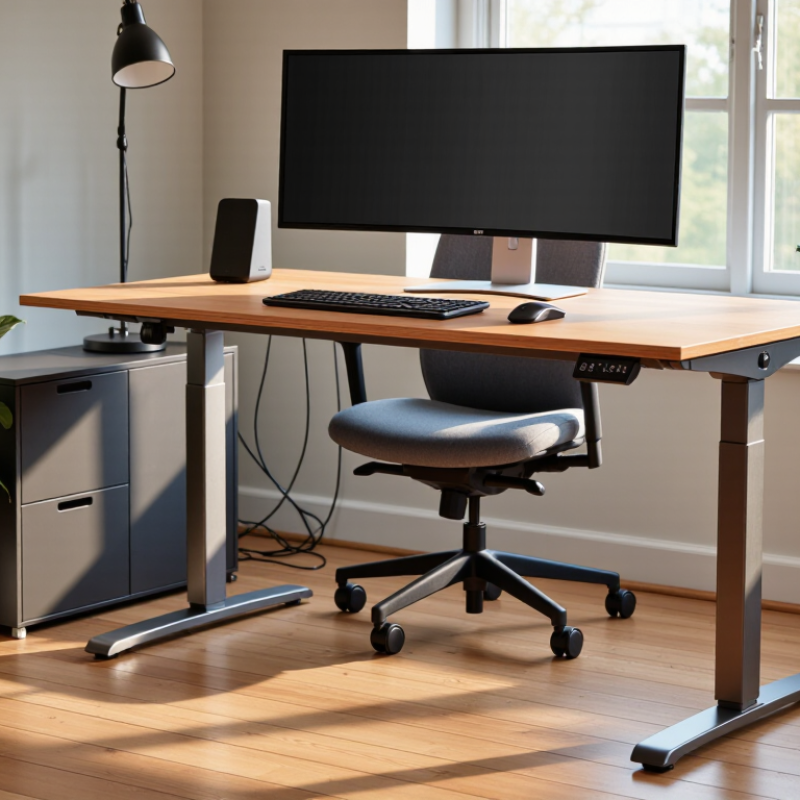
What Is a Height Adjustable Desk?

Definition and Purpose of a Height-Adjustable Desk

A height-adjustable desk is a work surface that moves between sitting and standing heights, either by hand or with an electric motor. Its purpose is to let people change working posture while keeping their monitor, keyboard, and mouse within comfortable reach. Seated, elbows can rest near desk height; standing, the screen should stay roughly at eye level. The aim is movement, not standing all day. That sounds simple. Real setups are less tidy: chair height, screen position, and even footwear can affect comfort.

Evidence supports the desk as a practical way to reduce sitting, not as a cure-all. A 2018 Cochrane review of workplace interventions reported that sit-stand desks reduced workplace sitting by about 100 minutes per workday in short-term studies. The authors rated the evidence as low quality, so the result should not be treated as a guaranteed outcome for every worker. A desk also cannot correct poor monitor placement by itself. Small adjustments matter, and the first standing sessions may feel awkward.

Tips: Set the desk so your shoulders stay relaxed and wrists remain fairly straight. Start with brief standing periods, then change position when comfortable. Keep frequently used items close; reaching across a raised desk gets old fast.

Common Types and Adjustment Mechanisms

A height-adjustable desk lets the work surface move between sitting and standing positions. Common designs include manual crank, gas-spring, and electric models. A crank turns a lifting column; it is simple, but repeated adjustment takes effort. Gas-spring desks use a lever and counterbalanced support, so the user guides the top by hand. Electric desks move with a button press. Some use one motor, while others use two; compare noise, rated load, and stability rather than assuming more motors always mean better performance.

Look closely at the adjustment mechanism in daily use. A keyboard, monitor, and mug add weight, and a frame can wobble when raised. Check the desk’s height range against your seated elbow position and standing posture. Test whether controls are easy to reach and whether cables stay clear during movement. Small details matter. A fast lift is useful, but it does not fix poor screen placement or an awkward chair.

The evidence supports changing posture, not standing all day. A 2018 Cochrane systematic review reported that sit-stand desks reduced workplace sitting by about 100 minutes per workday in short-term studies; the evidence was rated low certainty. That is a useful signal, not a guarantee for every worker or desk. Adjustment can also become a nuisance if the motor is noisy or the crank feels stiff. Trial the movement before buying, and consider whether the mechanism suits your routine.

Key Components and How They Work

What Is a Height Adjustable Desk?

Key Components and How They Work

A height adjustable desk combines a work surface, lifting frame, motors, and controls. The frame usually has telescoping legs that slide up or down. Electric models use motors to move the legs, while manual models rely on a crank or counterbalance. The tabletop stays attached to the frame as its height changes. Smooth movement depends on the parts working together.

The control panel sends a signal to a control box, which coordinates the motor or motors. Many electric desks include preset buttons, so users can save preferred sitting and standing heights. Some also have collision detection, though its sensitivity and performance vary. Check the manual rather than assuming it will stop every movement. That matters.

Feet at the bottom of the legs help steady the desk and can be adjusted to reduce wobble on uneven floors. A crossbar may add support, but its design can affect legroom. Cables need attention, too: leave enough slack for the full range of motion and keep them clear of moving parts. Small details count. A desk that moves quietly in a showroom may feel less stable with a heavy monitor and a leaning arm. That is a useful reminder to consider the whole setup, not just the lifting mechanism.

What Is a Height Adjustable Desk? — Key Components and How They Work

How it works: An electric desk uses a motor and control unit to move the lifting columns in its legs, raising or lowering the desktop. The frame supports the load, while the control panel lets you adjust the height. The chart shows an illustrative 60–125 cm travel range, with example seated and standing settings; the right height depends on the user and setup.

How to Set Up and Use One Ergonomically

Start by placing the desk on a stable, level floor, with enough room for your chair to move. Adjust the height until your elbows rest near a right angle and your shoulders feel relaxed. Keep your wrists straight, rather than tilted toward the keyboard. Small changes matter. Position the monitor about an arm’s length away, with its top near eye level; adjust for screen size and vision.

If you use a laptop, connect a separate keyboard and mouse so you can raise the screen without lifting your hands. Keep your feet flat on the floor, or use a firm footrest. Check that cables have enough slack when the desk moves. Nothing should snag.

Alternate sitting and standing instead of treating standing as the healthier default. Try short standing periods, then switch when you feel stiff or distracted; one schedule will not suit everyone. Walk briefly, too. While standing, keep your knees relaxed and spread your weight across both feet. A cushioned mat may feel better on a hard floor, but it cannot fix awkward posture. It is easy to raise the desk, feel productive, and forget to lower it again. Notice that habit, and adjust.

Benefits and Practical Considerations

What Is a Height Adjustable Desk?
Benefits and Practical Considerations

A height adjustable desk lets you switch between sitting and standing during the workday. Most use a hand crank or electric controls to raise and lower the desktop. Alternating positions can break up long periods of sitting and make it easier to move between tasks. Standing all day is not the goal. Comfort takes practice. A desk cannot replace movement, stretching, or a well-fitted chair.

Before choosing one, check its height range against your seated elbow position and standing posture. At the correct height, your shoulders stay relaxed and your wrists remain fairly straight while typing. Measure the space beneath the desk, too; a support bar can interfere with your knees. Consider stability, lifting noise, cable length, and the weight of monitors or other equipment. A crowded desktop may wobble more when raised. Frequent adjustments can also distract some people, so a gradual routine may work better. Realistically, the right setup takes trial and error.

Tips: Start with short standing periods, such as 15 minutes, then adjust based on comfort. Keep the screen near eye level and place frequently used items within easy reach. Change posture when you feel stiff. Small changes matter.

What Is a Height Adjustable Desk? - Benefits and Practical Considerations

Aspect Useful reference Potential benefit Practical consideration
Definition A desk whose work surface can be raised or lowered, manually or with a motor. Supports both seated and standing work at a height suited to the user. Adjustment mechanisms, height range, and controls vary by model.
Height range Many desks cover roughly 28–48 in (71–122 cm), but ranges differ. Allows users to change working posture during the day. Check the desk’s minimum and maximum height against your seated and standing needs; shorter or taller users may need a different range.
Work-surface size A 48 × 24 in (122 × 61 cm) surface is one common compact size; larger options are available. A suitable surface can accommodate a monitor, keyboard, and everyday work items. Measure the room and consider monitor stands, accessories, and the space needed for mouse movement.
Seated ergonomics Aim for relaxed shoulders, elbows near the sides, and forearms roughly parallel to the floor while typing. A properly adjusted setup can make neutral working postures easier to maintain. Chair height and, if needed, a footrest may need adjustment along with desk height.
Standing ergonomics Set the surface so shoulders stay relaxed and elbows remain comfortably bent while typing. Makes it possible to work standing without using a fixed-height counter. Standing for long uninterrupted periods can also be uncomfortable; change positions and move regularly.
Movement through the day Alternate sitting, standing, and brief movement breaks according to comfort and work needs. Encourages variation rather than staying in one position throughout the workday. There is no single schedule that suits everyone; increase standing time gradually if it is unfamiliar.
Adjustment method Manual desks use a hand crank or similar mechanism; electric desks use a motor and controls. Electric controls can make frequent height changes more convenient; manual designs do not require a powered lift. Consider adjustment speed, noise, power access, controls, and whether preset heights are useful.
Stability and load Weight limits and stability vary by frame, surface, height, and load distribution. A stable setup helps keep monitors and work equipment secure during height changes. Check the stated load capacity and account for the desktop, monitors, arms, and other equipment.
Cables and accessories Cables need enough slack to accommodate the full height adjustment range. Cable management can reduce clutter and help prevent cables from catching or disconnecting. Test cable routing at both the lowest and highest desk positions; position monitor arms and accessories accordingly.